Sunday, 12 February 2017

Monday, 8 September 2014
What you want in life
Had written a lot of Technical blogs . So now it's turn for Life again.

Read it somewhere and I totally agree on this:
“ The quality of your life is in direct proportion to the amount of uncertainty you can comfortably deal with.” ~Tony Robbins
There are many occasion in our life when we just don’t know what we want. These are the awkward moments where we feel uncertain and unsure, and perhaps even question our existence.
Always remember. You don't earn name or fame because you are beautiful and attractive. People get attracted or inspired only by your work and not look. Example Shahrukh khan, Kajol etc. There are thousands of beautiful girls in kashmir and other part of India who are more fairer & attractive than kajol but it's because of her work people recognize and admire her, and not for her complexion.I always underestimated the sentence "There is no substitute to hard work". But as life moved forward, I realized the importance of these lines. Life teaches us a lot.
Many people (including me ;)) these days have a lot of goals in our life but we actually don't realize what we truly want. We should not think what we want "from" life, but think what we want "in" life. And rightly said by Modi jee (Narendra Modi ) too :: "Kuch banne mein biswas maat rakho, kuch karne mein biswas rakho" (Don't try to become something, try to do something).
I had changed 4 companies in last 5 years. Friends and colleague thinks money is the main motive behind my frequent hops. To be very honest, that can be counted of one of the reason but practically that has a very small fraction of contribution in my decision to switch companies frequently. The actual reason is still unknown to me but there is something I am looking for but I am not able to get things in right direction for myself and I think thats what we call life. And this time I went one step ahead, apart from changing company I moved to a different city too, in search of **SOMETHING**. And I am being very honest here. I really don't know what that **SOMETHING** is. Leaving Bangalore was a pain and I have plan in future to move back to Bangalore. But let's see where does life takes me.
Even at some sort I thought to start my own business but I didn't had that much courage or will power to do that. We indians will never become a great entrepreneur as westerns do for obvious reasons. Our parents set our goal for our life (I am not complaining here, they do that for our good future only).....good grade.....good college....good job....car...house....family.....etc..... and by the time we realize our actual needs and our purpose of existence,it's time to leave this world. We then think that if we have the power to go back to older days and rectify our mistakes then things would have been different. But that's what life is, we can't change things as per our convenience and who knows the things would been more worse after that.

Read it somewhere and I totally agree on this:
“ The quality of your life is in direct proportion to the amount of uncertainty you can comfortably deal with.” ~Tony Robbins
There are many occasion in our life when we just don’t know what we want. These are the awkward moments where we feel uncertain and unsure, and perhaps even question our existence.
Always remember. You don't earn name or fame because you are beautiful and attractive. People get attracted or inspired only by your work and not look. Example Shahrukh khan, Kajol etc. There are thousands of beautiful girls in kashmir and other part of India who are more fairer & attractive than kajol but it's because of her work people recognize and admire her, and not for her complexion.I always underestimated the sentence "There is no substitute to hard work". But as life moved forward, I realized the importance of these lines. Life teaches us a lot.
Many people (including me ;)) these days have a lot of goals in our life but we actually don't realize what we truly want. We should not think what we want "from" life, but think what we want "in" life. And rightly said by Modi jee (Narendra Modi ) too :: "Kuch banne mein biswas maat rakho, kuch karne mein biswas rakho" (Don't try to become something, try to do something).
I had changed 4 companies in last 5 years. Friends and colleague thinks money is the main motive behind my frequent hops. To be very honest, that can be counted of one of the reason but practically that has a very small fraction of contribution in my decision to switch companies frequently. The actual reason is still unknown to me but there is something I am looking for but I am not able to get things in right direction for myself and I think thats what we call life. And this time I went one step ahead, apart from changing company I moved to a different city too, in search of **SOMETHING**. And I am being very honest here. I really don't know what that **SOMETHING** is. Leaving Bangalore was a pain and I have plan in future to move back to Bangalore. But let's see where does life takes me.
Even at some sort I thought to start my own business but I didn't had that much courage or will power to do that. We indians will never become a great entrepreneur as westerns do for obvious reasons. Our parents set our goal for our life (I am not complaining here, they do that for our good future only).....good grade.....good college....good job....car...house....family.....etc..... and by the time we realize our actual needs and our purpose of existence,it's time to leave this world. We then think that if we have the power to go back to older days and rectify our mistakes then things would have been different. But that's what life is, we can't change things as per our convenience and who knows the things would been more worse after that.
Monday, 25 August 2014
Zindagi Gulzar Hai
This is perhaps the first Pakistani serial I had watched and probably the best hindi serial (I am referring to romantic genre only) I had watched till date. A great acting by all star cast but mainly Fawad Afzal Khan (Zaroon) and Sanam Saeed (kashaf) .
Zindagi Khaaq Na Thi, Khaaq Udate Guzri
Tujh Se Kya Kehte, Tere Paas Jo Aate Guzri
Zindagi……….
Din Jo Guzra To Kisi Yaad Ki Ro Mein Guzra
Shaam Aayi To Koi Khwaab Dikhate Guzri
Tujh Se Kya Kehte, Tere Paas Jo Aatey Guzri
Zindagi……….
Acche Waqtoon Ki Tamanna Mein Rahi Umar-e-Rawaan
Waqt Aisa Tha Ki Bus Naaz Uthate Guzri
Tujh Se Kya Kehte, Tere Paas Jo Aate Guzri
Zindagi………..
Raat Kya Aayi Ki Tanhai Ke Sargoshi Mein
Ghum Ka Aalam Tha Magar Sunte Sunate Guzri
Tujh Se Kya Kehte, Tere Paas Jo Aate Guzri
Zindagi………. Zindagi………… Zindagi……………
Below is the full lyrics of one of the songs which I liked the most.......
Tujh Se Kya Kehte, Tere Paas Jo Aate Guzri
Zindagi……….
Din Jo Guzra To Kisi Yaad Ki Ro Mein Guzra
Shaam Aayi To Koi Khwaab Dikhate Guzri
Tujh Se Kya Kehte, Tere Paas Jo Aatey Guzri
Zindagi……….
Acche Waqtoon Ki Tamanna Mein Rahi Umar-e-Rawaan
Waqt Aisa Tha Ki Bus Naaz Uthate Guzri
Tujh Se Kya Kehte, Tere Paas Jo Aate Guzri
Zindagi………..
Raat Kya Aayi Ki Tanhai Ke Sargoshi Mein
Ghum Ka Aalam Tha Magar Sunte Sunate Guzri
Tujh Se Kya Kehte, Tere Paas Jo Aate Guzri
Zindagi………. Zindagi………… Zindagi……………
Thursday, 12 June 2014
How to install Logstash with Kibana interface??
We will need to install below stuffs to start with our activity:
1) Nginx
2) Logstash - You can get from the from this link : https://download.elasticsearch.org/logstash/logstash/logstash-1.4.1.tar.gz
3) Elasticsearch
4) Kibana
Step 1: Add the official ElasticSearch repository for Version 1.1.x
$ sudo vi /etc/yum.repos.d/elasticsearch.repo
Step 2: Add the following content to this file
[elasticsearch-1.1]
name=Elasticsearch repository for 1.1.x packages
baseurl=http://packages.elasticsearch.org/elasticsearch/1.1/centos
gpgcheck=1
gpgkey=http://packages.elasticsearch.org/GPG-KEY-elasticsearch
enabled=1
Step 3: Install required packages. You may need to install more if packages are not installed earlier.
sudo yum install nginx elasticsearch policycoreutils-python
Step 4: Create the following directories:
$ sudo mkdir -p /var/log/nginx/kibana
$ sudo mkdir -p /usr/share/nginx/kibana/public
$ sudo mkdir -p /etc/nginx/sites-available
$ sudo mkdir -p /etc/nginx/sites-enabled
Step 5: Go to the nginx directory [ /etc/nginx/] and replace nginx.conf with the below one:
$ sudo wget https://github.com/kulshresht/nginx/blob/master/nginx.conf
Step 6: Go to the nginx vhost directory
$ cd /etc/nginx/sites-available/
You can get the official kibana vhost that kibana provides from below link:
https://github.com/elasticsearch/kibana/blob/master/sample/nginx.conf
But I had made changes and disabled password protected endpoints. You can get the mofidied version at below link.
$ sudo wget https://github.com/kulshresht/nginx/blob/master/kibana
P.S: Server name needs to be replaced with variable {$hostname}
Step 7: Symbolic link the vhost file so nginx will load it
$ sudo ln -s /etc/nginx/sites-available/kibana /etc/nginx/sites-enabled/kibana
Step 8: Go to the kibana folder
$ cd /usr/share/nginx/kibana/public
Step 9: Download the latest Kibana version
$ sudo wget https://download.elasticsearch.org/kibana/kibana/kibana-latest.tar.gz
Step 10: Untar Kibana and fix directory stucture
$ sudo tar xzfv kibana-latest.tar.gz
$ sudo mv kibana-latest/* .
$ sudo rm -rf kibana-latest.tar.gz
$ sudo rm -rf kibana-latest
Step 11: Open the config.js file
$ sudo vi config.js
Step 12: Change the file a bit
Change the following line:
default_route : '/dashboard/file/default.json',
To the following:
default_route : '/dashboard/file/kulshresht.json',
Step 13: Go to the dashboard directory
$ cd /usr/share/nginx/kibana/public/app/dashboards
Step 14: Download the following version of kulshresht.json
$ sudo wget https://github.com/kulshresht/nginx/blob/master/kulshresht.json
The downloaded version is identical to the official file with little bit of changes in the graph size and how the logs show.
Step 15: Create a nologin user called kibana
$ sudo useradd -s /sbin/nologin kibana
Step 16: Chown the web dir to kibana:nginx
$ sudo chown -R kibana:nginx /usr/share/nginx/kibana/
Step 17: Start Logstash, ElasticSearch and Nginx
$ sudo service elasticsearch start
$ sudo service logstash start
$ sudo service nginx start
If you now go to your website for example for me “http://{$hostname}” you will see the awesome UI.

How to setup Logstash:
Step 1:
- cd /opt
- sudo wget https://download.elasticsearch.org/logstash/logstash/logstash-1.4.1.tar.gz
- sudo tar -xvf logstash-1.4.1.tar.gz
- cd logstash-1.4.1
- sudo vim redis.conf - > Add below content inside redis.conf (This is server side settings where kibana and redis and running). Losgtash config file settings for shipper will be different.
***********************************
input {
redis {
host => "{Server-IP}"
type => "redis"
data_type => "list"
key => "logstash"
}
}
output {
elasticsearch
{
host => localhost
}
stdout { codec => rubydebug }
}
***********************************
Step 2: Change the ownership of the Logstash config file
$ sudo chown logstash:logstash logstash.conf
Step 3: Start logstash -> cd logstash-1.4.1
# bin/logstash -f redis.conf -vv
How to setup Redis server:
Step 1: sudo wget http://download.redis.io/releases/redis-2.8.10.tar.gz
Step 2: sudo tar -xvf redis-2.8.10.tar.gz
Step 3: cd redis-2.8.10
Step 4: sudo make
Step 5: sudo make install
Step 6: cd /opt/redis-2.8.10/src
Step 7: Start redis server: # sudo ./redis-server
Wednesday, 12 March 2014
Mobile redirection
Assumption: There is a site kulshresht.com and it supports both version, Desktop and mobile site but with different code base on each of them.
Desktop version --> www.kulshresht.com
Mobile site --> m.kulshresht.com
The below rule redirect visitors from different mobile devices to mobile site.We have also added a support for a cookie, so that mobile users can still opt to visit the full site, in case they don't like mobile site.
The first block checks to see if it is a mobile device and there is neither a cookie nor a url parameter set. If those conditions are met, redirect the visitor to the mobile site. The second block looks to see if the url parameter is set and there is no cookie. If those conditions are met, set a cookie for the user.
In practice, this will automatically redirect mobile users to a mobile site. On the mobile site, add a link going to www.kulshresht.com?fullbrowser=1. When the visitor uses that link, they will get back to the original site, a cookie will be set, and they can now bypass the redirect while the cookie is still valid. The point is to redirect mobile visitors, but not permanently if they still want to visit the full version of the site.
Download Apache config from http://detectmobilebrowsers.com/ and we can use that for detecting mobile in mod rewrite.
RewriteEngine On
RewriteCond %{HTTP_HOST} ^www.kulshresht.com [NC,OR] RewriteCond %{HTTP_HOST} ^kulshresht.com [NC]
RewriteCond %{HTTP_USER_AGENT}
(android|bb\d+|meego).+mobile|avantgo|bada\/|blackberry|blazer|compal|elaine|fennec|hiptop|iemobile|ip(hone|od)|iris|kindle|lge\
|maemo|midp|mmp|mobile.+firefox|netfront|opera\ m(ob|in)i|palm(\
os)?|phone|p(ixi|re)\/|plucker|pocket|psp|series(4|6)0|symbian|treo|up\.(browser|link)|vodafone|wap|windows\
(ce|phone)|xda|xiino [NC,OR]
RewriteCond %{HTTP_USER_AGENT}
^(1207|6310|6590|3gso|4thp|50[1-6]i|770s|802s|a\
wa|abac|ac(er|oo|s\-)|ai(ko|rn)|al(av|ca|co)|amoi|an(ex|ny|yw)|aptu|ar(ch|go)|as(te|us)|attw|au(di|\-m|r\
|s\ )|avan|be(ck|ll|nq)|bi(lb|rd)|bl(ac|az)|br(e|v)w|bumb|bw\-(n|u)|c55\/|capi|ccwa|cdm\-|cell|chtm|cldc|cmd\-|co(mp|nd)|craw|da(it|ll|ng)|dbte|dc\-s|devi|dica|dmob|do(c|p)o|ds(12|\-d)|el(49|ai)|em(l2|ul)|er(ic|k0)|esl8|ez([4-7]0|os|wa|ze)|fetc|fly(\-|_)|g1\
u|g560|gene|gf\-5|g\-mo|go(\.w|od)|gr(ad|un)|haie|hcit|hd\-(m|p|t)|hei\-|hi(pt|ta)|hp(\
i|ip)|hs\-c|ht(c(\-|\ |_|a|g|p|s|t)|tp)|hu(aw|tc)|i\-(20|go|ma)|i230|iac(\
|\-|\/)|ibro|idea|ig01|ikom|im1k|inno|ipaq|iris|ja(t|v)a|jbro|jemu|jigs|kddi|keji|kgt(\
|\/)|klon|kpt\ |kwc\-|kyo(c|k)|le(no|xi)|lg(\ g|\/(k|l|u)|50|54|\-[a-w])|libw|lynx|m1\-w|m3ga|m50\/|ma(te|ui|xo)|mc(01|21|ca)|m\-cr|me(rc|ri)|mi(o8|oa|ts)|mmef|mo(01|02|bi|de|do|t(\-|\
|o|v)|zz)|mt(50|p1|v\
)|mwbp|mywa|n10[0-2]|n20[2-3]|n30(0|2)|n50(0|2|5)|n7(0(0|1)|10)|ne((c|m)\-|on|tf|wf|wg|wt)|nok(6|i)|nzph|o2im|op(ti|wv)|oran|owg1|p800|pan(a|d|t)|pdxg|pg(13|\-([1-8]|c))|phil|pire|pl(ay|uc)|pn\-2|po(ck|rt|se)|prox|psio|pt\-g|qa\-a|qc(07|12|21|32|60|\-[2-7]|i\-)|qtek|r380|r600|raks|rim9|ro(ve|zo)|s55\/|sa(ge|ma|mm|ms|ny|va)|sc(01|h\-|oo|p\-)|sdk\/|se(c(\-|0|1)|47|mc|nd|ri)|sgh\-|shar|sie(\-|m)|sk\-0|sl(45|id)|sm(al|ar|b3|it|t5)|so(ft|ny)|sp(01|h\-|v\-|v\
)|sy(01|mb)|t2(18|50)|t6(00|10|18)|ta(gt|lk)|tcl\-|tdg\-|tel(i|m)|tim\-|t\-mo|to(pl|sh)|ts(70|m\-|m3|m5)|tx\-9|up(\.b|g1|si)|utst|v400|v750|veri|vi(rg|te)|vk(40|5[0-3]|\-v)|vm40|voda|vulc|vx(52|53|60|61|70|80|81|83|85|98)|w3c(\-|\
)|webc|whit|wi(g\ |nc|nw)|wmlb|wonu|x700|yas\-|your|zeto|zte\-) [NC]
RewriteCond %{QUERY_STRING} !^.*fullbrowser=1.*$ [NC] RewriteCond %{HTTP_COOKIE} !fullbrowser=1 [NC] RewriteRule ^(.*)$ http://m.kulshresht.com$1 [R=302,L] # Set cookie, if user doesn't want to be redirected RewriteCond %{QUERY_STRING} ^.*fullbrowser=1.*$ RewriteCond %{HTTP_COOKIE} !^.*fullbrowser.*$ [NC] RewriteRule .* - [co=fullbrowser:1:www.kulshresht.com] |
References:
http://www.phillipadsmith.com/2011/11/note-to-self-a-simple-way-to-accomplish-mobile-site-redirection-using-mod-rewrite.htmlhttp://david.narrabilis.com/node/40
Sunday, 12 January 2014
Apache Performance Tunning / Apache Optimization
Apache Optimization
[kulshresht@dev server ~]# httpd -l
Compiled in modules:
core.c
prefork.c
http_core.c
mod_so.c
Apache 2 is available with following 2 MPM modules: Prefork & Worker
To check which MPM module it is running on your server, use below command:
[kulshresht@dev server~]$ /usr/sbin/httpd -l | egrep "prefork|worker"
prefork.c
The most important configuration file for Apache is httpd.conf which is located at /etc/httpd/conf [for Centos].We will try to tune this configuration file.For example:
vim /etc/httpd/conf/httpd.conf
Will write a sample configuration first and then try to explain all parameters and how to tune them one by one.
# prefork MPM
# StartServers: number of server processes to start
# MinSpareServers: minimum number of server processes which are kept spare
# MaxSpareServers: maximum number of server processes which are kept spare
# ServerLimit: maximum value for MaxClients for the lifetime of the server
# MaxClients: maximum number of server processes allowed to start
# MaxRequestsPerChild: maximum number of requests a server process serves
<IfModule prefork.c>
StartServers 20
MinSpareServers 20
MaxSpareServers 50
ServerLimit 2000
MaxClients 2000
MaxRequestsPerChild 2000
</IfModule>
|
StartServers : StartServers directive sets how many server processes are created upon start up. Since web server dynamically kills and creates server processes based on traffic load, it is not necessary to change this parameter.
MinSpareServers and MaxSpareServers:
These values are only used with the prefork MPM. They adjust how the Apache HTTP Server dynamically adapts to the perceived load by maintaining an appropriate number of spare server processes based on the number of incoming requests. The server checks the number of servers waiting for a request and kills some if there are more than MaxSpareServers or creates some if the number of servers is less than MinSpareServers.
The default MinSpareServers value is 5; the default MaxSpareServers value is 20. These default settings should be appropriate for most situations. Be careful not to increase the MinSpareServers to a large number as doing so creates a heavy processing load on the server even when traffic is light.
MinSpareThreads and MaxSpareThreads:
These values are only used with the worker MPM. They adjust how the Apache HTTP Server dynamically adapts to the perceived load by maintaining an appropriate number of spare server threads based on the number of incoming requests. The server checks the number of server threads waiting for a request and kills some if there are more than MaxSpareThreads or creates some if the number of servers is less than MinSpareThreads.
The default MinSpareThreads value is 25; the default MaxSpareThreads value is 75. These default settings should be appropriate for most situations. The value for MaxSpareThreads must be greater than or equal to the sum of MinSpareThreads and ThreadsPerChild, else the Apache HTTP Server automatically corrects it.
ThreadsPerChild: This value is only used with the worker MPM. It sets the number of threads within each child process. The default value for this directive is 25.
MaxClients: MaxClients sets a limit on total number of concurrent connections. Will let you know in a while about how to determine that value.The server's default is set to 150 regardless of the MPM in use.There is no point in keeping this value very high until and unless you have huge traffic serving site. A high value can lead to a complete server hang in case of a DOS attack. A value too low can create timeout problems for your clients if the limit is reached.So take appropriate decision after seeing production behavior during high load by using below technique.
Use below shell script to determine an average amount of memory consumed by one Apache process. In addition to that it will show total amount of memory consumed by all Apache processes.
[kulshresht@server1 ~]$ ps -ylC httpd | awk '{x += $8;y += 1} END {print "Apache Memory Usage (MB): "x/1024; print "Average Proccess Size (MB): "x/((y-1)*1024)}'
Apache Memory Usage (MB): 821.441
Average Proccess Size (MB): 6.08475
Execute the above script several times during high load to get optimum result.Now we know average amount of memory consumed by Apache and total amount of memory of your server, it is possible to calculate value to be used for MaxClients setting. For example, if in average one of your Apache process consumes 6MB RAM and server RAM is 16GB, and you want to leave 8GB for the rest processes, then:
MaxClients = (16GB – 8GB)/6MB = 1365
ServerLimit : This value should be same as MaxClients. But MaxClient setting can be changed on the fly without restarting Apache whereas ServerLimit new value needs Apache restart.
MaxRequestsPerChild: MaxRequestsPerChild sets the total number of requests each child server process serves before the child dies. The main reason for setting MaxRequestsPerChild is to avoid long-lived process induced memory leaks. The default MaxRequestsPerChild for the prefork MPM is 4000 and for the worker MPM is 0.We should definitely set some value for this parameter (pls do not ignore this ) to avoid memory leak by long lived process in worst case scenario.
If you still wish to switch to "worker" module, it is sufficient to uncomment this directive in the /etc/sysconfig/httpd file:
# grep HTTPD= /etc/sysconfig/httpd
#HTTPD=/usr/sbin/httpd.worker
and restart Apache:#HTTPD=/usr/sbin/httpd.worker
/etc/init.d/httpd restart
References:
http://httpd.apache.org/docs/current/mod/prefork.html
http://www.centos.org/docs/4/4.5/Reference_Guide/s3-apache-minmaxsparethreads.html
http://kb.parallels.com/en/113007
https://code.google.com/p/check-httpd-limits/
http://www.zarafa.com/wiki/index.php/Apache_tuning
Friday, 10 January 2014
Redis cache monitoring / Automating telnet session using bash scripts
Below is a combination of shell & expect script which helps to monitor Redis cache.
Get your shell script [redistest.sh] embedded in Nagios/Zenoss [ or whichever monitoring tool you are using ] to set up monitoring for redis cache.
Get your shell script [redistest.sh] embedded in Nagios/Zenoss [ or whichever monitoring tool you are using ] to set up monitoring for redis cache.
redistest.sh
#!/bin/bash
set -x
var=`/tmp/redistest| awk '{print $1}'|grep PONG|cut -c2-5`
echo $var
if [ "$var" == "PONG" ]
then
echo "Redis is now running fine |"
exit 0
else
echo "Redis is having some issue |"
exit 2
fi
echo "Unknown error|"
exit 3
|
redistest
#!/usr/bin/expect
set timeout 5
set serverip "10.50.16.10"
set port 6379
spawn telnet $serverip $port
send "ping\r"
expect "+PONG"
exit
|
Reference:
Sunday, 29 December 2013
Puppet - Bit Advanced setup and configuration
Advanced puppet configuration:
Agenda: What exactly I am trying to replicate here.I will be trying to keep 'mod_jk.conf' file which I had placed inside '/etc/puppet/files' folder of master server to keep in sync. Whenever I make any changes to mod_jk.conf file on puppet master,the daemon running on puppet agent will pick up the changes on master and bring agent in sync with puppet master. It will also restart Apache webserver where puppet agent is installed.
Create a file inside '/etc/puppet/manifests'. Touch site.pp.
site.pp
import 'classes/*.pp'
class toolbox {
file { '/tmp/gautam.txt':
owner => root, group => root, mode => 0755,
content => "Hi gautam....how are you",
}
}
node 'beta01.hs18.lan' {
include toolbox
include apache
include mysite
}
|
Create a folder 'classes' inside '/etc/puppet/manifests'. Now create two files inside classes folder.
apache.pp
mysite.pp
apache.pp
class apache {
package { 'mod_ssl-2.2.15-29.el6.centos.x86_64':
ensure => installed
}
service { 'httpd':
ensure => running,
hasstatus => true,
hasrestart => true,
}
}
|
mysite.pp
class mysite {
file { '/etc/httpd/conf.d/mod_jk.conf':
owner => root, group => root, mode => 0644,
source => "puppet:///files/mod_jk.conf",
}
}
|
fileserver.conf [Please modify the content as per your requirement]
# This file consists of arbitrarily named sections/modules
# defining where files are served from and to whom
# Define a section 'files'
# Adapt the allow/deny settings to your needs. Order
# for allow/deny does not matter, allow always takes precedence
# over deny
[files]
path /etc/puppet/files/
allow *
# allow *.hs18.lan
# deny *.evil.example.com
# allow 192.168.0.0/24
#
[mount_point]
path /etc/puppet/files/
allow *
|
make a folder 'files' inside '/etc/puppet' and place our file [mod_jk.conf in my case]
Now start puppet agent as explained in my previous blog ( http://kulshresht-gautam.blogspot.in/2013/12/getting-started-with-puppet-basic-setup.html ) and play around with it.
Please watch the below video for better understanding.
http://www.youtube.com/watch?v=Hiu_ui2nZa0
Getting started with Puppet - Basic setup
In this blog I will try to explain about basic setup of puppet. Assuming that you are already aware about need/benefits of puppet.
Prerequisites:
- Need two servers for this activity.Will make one of the server as puppet master and the other as puppet agent.
- The other main prerequisites for installing puppet on redhat/centos is that we need to have the following.
- Ruby Language
- Ruby Libraries
- Shadow Ruby Libraries
In this example the name of two server is 'kulshresht1.home.lan' & 'kulshresht2.home.lan'
For understanding well:
kulshresht1.home.lan --> puppetmaster.example.org --> 10.50.20.19
kulshresht2.home.lan --> puppetagent.example.org --> 10.50.20.30
Map the server name as 'puppetmaster.example.org' and 'puppetagent.example.org' respectively in '/etc/hosts' file. It's better if you can get this registered in your local DNS for lookup.
Install puppet server on master server
puppet master server must contain the following packages:
- Pupppet :: contains the puppet agent
- Puppet-server :: contains the puppet master server
- facter :: contain the tool which will act as fetching information about the node
Install puppet on agent server
For testing basic setup and get puppet working , make "Agent side configuration changes" only, as stated below, and run the below command on puppet agent server. This is basic setup of puppet.
#puppet agent --no-daemonize --onetime --verbose
Now go on puppet master screen and sign the certificate using below commands
puppet cert list
puppet cert sign "puppetagent.example.org"
Few useful commands:
puppet cert clean puppetmaster.example.org
START PUPPET AGENT:
puppet agent --no-daemonize --onetime --verbose
TEST AGENT:
puppet agent --test
CREATE/GENERATE CERTIFICATE:
puppet certificate generate puppetagent.example.org --ca-location remote
HOW TO SIGN CERTIFICATE:
puppet cert list
puppet cert sign "puppetagent.example.org"
----------------------------------Agent side configuration changes-------------------------------------
Add below settings in "puppet.conf" on agent side.
server= kulshresht1.home.lan / puppetmaster.example.org
puppet.conf
[main]
# The Puppet log
directory.
# The default
value is '$vardir/log'.
logdir =
/var/log/puppet
# Where Puppet
PID files are kept.
# The default
value is '$vardir/run'.
rundir =
/var/run/puppet
# Where SSL
certificates are kept.
# The default
value is '$confdir/ssl'.
ssldir =
$vardir/ssl
server=
|
Please go through http://kulshresht-gautam.blogspot.in/2013/12/puppet-bit-advanced-setup-and.html for advance puppet setup.
Wednesday, 25 December 2013
How to find out what exactly is consuming space on my hard drive
Working nowadays a lot on linux had made me extremely week in windows environment. Hahahahahaha...;)
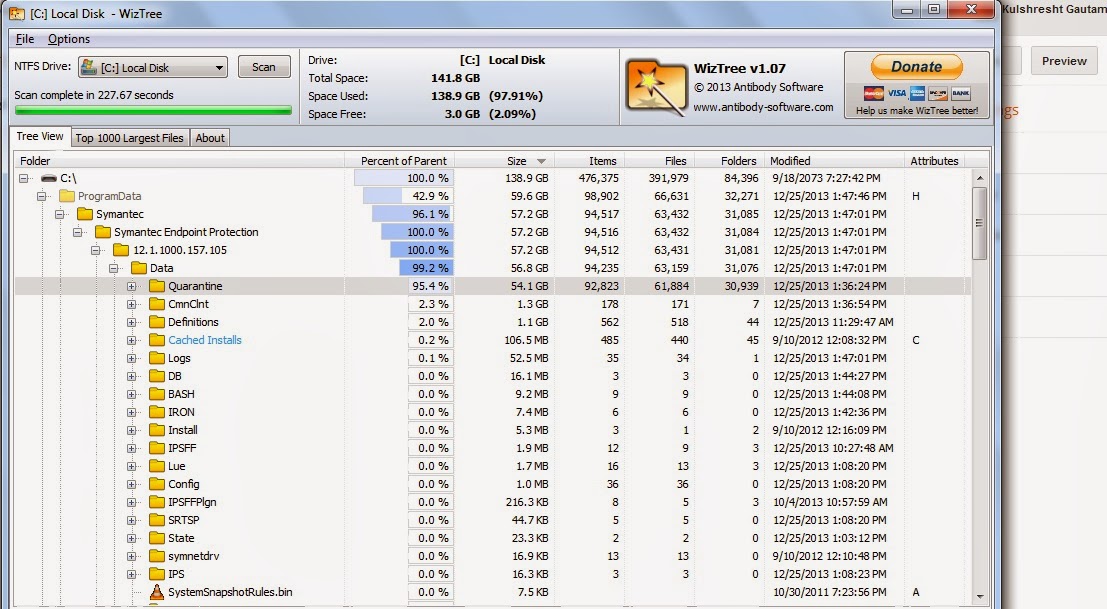
Was unable to figure out for a long time about what exactly is consuming space on my hard drive (Windows).
Googled a bit and came across a good software ( WizTree ) which resolved my issue within couple of minutes. Thought to share the same. Snapshot is attached below.
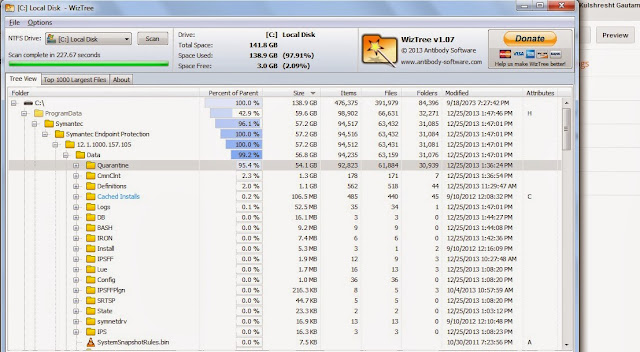
Was unable to figure out for a long time about what exactly is consuming space on my hard drive (Windows).
Googled a bit and came across a good software ( WizTree ) which resolved my issue within couple of minutes. Thought to share the same. Snapshot is attached below.
Link to download the software:
Merry Christmas and have a great day ahead. GOD bless you all.
Thursday, 24 October 2013
Kryo Serialization Strategy
Kryo is a fast and efficient object graph serialization framework for Java which is much faster and efficient compared to java serialization.The project is useful any time objects need to be persisted, whether to a file, database, or over the network.Kryo can also perform automatic deep and shallow copying/cloning. This is direct copying from object to object, not object->bytes->object
In one of my previous post I had explained about how to integrate tomcat with memcache for session clustering: http://kulshresht-gautam.blogspot.in/2013/07/integrating-tomcat-with-memcahed-for.html
Now in addition to do that post here I would focus on how to override java serialization with kryo serialization which is more faster and efficient compared to the earlier one [http://code.google.com/p/thrift-protobuf-compare/wiki/Benchmarking ].The aim is still to implement memcached-session-manager but we would use kryo serialization instead of normal java serialization.
First Option :
- As msm is available in maven central (under groupId de.javakaffee.msm) you can just pull it in using the dependency management of your build system. With maven you can use this dependency definition for the kryo-serializer:
<dependency>
    <groupId>de.javakaffee.msm</groupId>
    <artifactId>msm-kryo-serializer</artifactId>
    <version>1.6.5</version>
    <scope>runtime</scope>
</dependency>
Second Option :
- If you're not using a dependency management based on maven repositories then below are the jars you need for kryo serializers. Please download the appropriate jars and put them in $CATALINA_HOME/lib/ .
- memcached-session-manager-${version}.jar
- memcached-session-manager-tc7-${version}.jar
- kryo
- kryo-serializers-0.10.jar
- minlog
- msm-kryo-serializer-1.6.5.jar
- reflectasm-1.01.jar
- asm-3.2.jar
- spymemcached-2.8.12.jar
- couchbase-client-1.1.4.jar
The next task would be to add below entries in $CATALINA_HOME/conf/context.xml
<Context>

..................

        <Manager className="de.javakaffee.web.msm.MemcachedBackupSessionManager"

                 memcachedNodes="n1:hostname1:11211,n2:hostname2:11211"

                 failoverNodes="n2"

                 requestUriIgnorePattern=".*\.(ico|png|gif|jpg|css|js)$"

                 transcoderFactoryClass="de.javakaffee.web.msm.serializer.kryo.KryoTranscoderFactory"

        />

</Context>
Restart tomcat and you are done.
References:
http://code.google.com/p/kryo/
https://code.google.com/p/memcached-session-manager/
Wednesday, 23 October 2013
Simple Spring Memcached [ Memcached + Spring Caching ]
Introduction
Memcached is undoubtedly one of the most popular distributed caching system used across applications. Through his post I will try to make you understand on how to integrate memcache with a Spring enabled applications. Since Spring directly supports only Ehcache therefore we will use google's SSM (Simple Spring Memcache ) to use spring caching abstraction.Getting started
1. Dependencies - For downloading SSM dependencies add following to your POM.
  com.google.code.simple-spring-memcached
  spring-cache
  3.2.0


  com.google.code.simple-spring-memcached
  spymemcached-provider
  3.2.0
2. Enable Caching – To enable caching in your spring application add following to your spring memcached.xml.
<cache:annotation-driven/>
3. Configure Spring to enable Memcached based caching – Add following to your application memcached.xml.
           // "applicationData1" is 1st cache Name for your code


           // "applicationData2" is 2nd cache Name for your code
** Note: You have to keep on adding "applicationData1", "applicationData2" ......."applicationData.....N" if you have N number of cache name for your application.
Limitation: You are having common key for two different value as mentioned below.
@Cacheable(value = "applicationData1", key = #EmployeeId")
@Cacheable(value = "applicationData2", key = #EmployeeId")
In above scenario two same key are trying to put some value therefore one key will overwrite the other key value and will lead to data corruption. To avoid this we have to make our key unique. This can be achieved by adding a string in-front of the key as done below.
@Cacheable(value = "applicationData1", key = "'applicationData1'+#EmployeeId")
@Cacheable(value = "applicationData2", key = "'applicationData2'+#EmployeeId")
If you have no constraint about overwriting cache value then there is no need for making your key unique and everything can be put in single memcache.
As stated earlier in my different post "phpMemCachedAdmin" is a great tool to Monitor And Debug Memcached Server [ http://kulshresht-gautam.blogspot.in/2013/08/how-to-monitor-and-debug-memcached.html ]. In the snap below you can see that the key and it's corresponding size. Expiration time for these keys are infinite which is clearly visible from snapshot below.

How to install memcache : I had explained it here: http://kulshresht-gautam.blogspot.in/2013/07/memcached-installation.html
References:
https://code.google.com/p/simple-spring-memcached/wiki/Getting_Started
https://code.google.com/p/simple-spring-memcached/wiki/UserGuide#Cache_zone
Friday, 20 September 2013
How to implement and use Awstats and Jawstats !!!!!! Alternative to weblog expert!!!!! Analytic tool for logs
Awstats is a free, powerful and classy tool for Logs analytics. In this blog i would explain you on how to get started with awstats and it's full use and implementation . This is one of the most useful tool for analyzing Apache logs (but can be used to analyse any sort of logs). I will be explaining things here w.r.t Apache logs. Installing, configuring and using awstats is very easy. But problem occurs when you have distributed system and you want to bring all the logs to one location and apply the analytic on a merged log file. I had tried to explain whatever problems I faced along with solution. Hopefully you don't have to fight much after going through this blog :).
Getting started:
Install awstats on your linux box using yum commnad :
sudo yum install awstats
Vim the domain’s configuration file (located at /etc/awstats) and edit following line via text editor:
Vim awstats.xyz.com.conf
LogFile="/var/log/httpd/xyz.log"
SiteDomain="xyz.com"
HostAliases="servername (e.g: dev.home.lan)"
DirCgi="/var/www/cgi-bin"
DirIcons="../awstats/icon"
|
[kulshresht@dev:/etc/awstats]$ll
-rw-r--r-- 1 root root 61936 Aug 29 13:51 awstats.xyz.com.conf
-rw-r--r-- 1 root root 61665 Feb 21 2013 awstats.localhost.localdomain.conf
-rw-r--r-- 1 root root 61665 Feb 21 2013 awstats.model.conf
/var/lib/awstats --> Database location for awstats
Merging Logs:
One of the solution for aggregating logs from different servers is to get a nfs mounted on all the production servers. Ship all the logs from individual production servers to the NFS (or any common location).
Rsync individual server's Apache logs to a common location (nfs in my case)
On server 1 : rsync -avrL /var/log/httpd/access.log /nfs/Apache_logs/access.log
On server 2 : rsync -avrL /var/log/httpd/access.log /nfs/Apache_logs/access1.log
On server 3 : rsync -avrL /var/log/httpd/access.log /nfs/Apache_logs/access2.log
Use below command to merge all the 3 log files.
sudo /usr/share/awstats/tools/logresolvemerge.pl access.log access1.log access2.log > access_final.log
More detail about logresolvemerge.pl at below link : http://awstats.sourceforge.net/docs/awstats_tools.htm
Linux sometime doesn't understand too many parameters. So it's better we should put the commands inside shell script and give shell script path inside crontab. All cron and shell script has been mentioned below:Merging Logs:
One of the solution for aggregating logs from different servers is to get a nfs mounted on all the production servers. Ship all the logs from individual production servers to the NFS (or any common location).
Rsync individual server's Apache logs to a common location (nfs in my case)
On server 1 : rsync -avrL /var/log/httpd/access.log /nfs/Apache_logs/access.log
On server 2 : rsync -avrL /var/log/httpd/access.log /nfs/Apache_logs/access1.log
On server 3 : rsync -avrL /var/log/httpd/access.log /nfs/Apache_logs/access2.log
Use below command to merge all the 3 log files.
sudo /usr/share/awstats/tools/logresolvemerge.pl access.log access1.log access2.log > access_final.log
More detail about logresolvemerge.pl at below link : http://awstats.sourceforge.net/docs/awstats_tools.htm
Cron Entries:
Crontab -e
*/5 * * * * /home/kulshresht/awstats.sh > /dev/null
2>&1
*/5 * * * * /home/kulshresht/logmerge.sh > /dev/null
2>&1
1 0 * * * /home/kulshresht/logrotate.sh > /dev/null
2>&1
|
Contents of all shell scripts mentioned in Cron above:
awstats.sh [Awstats run to generate the statistic data:]
#! /bin/bash
/usr/share/awstats/wwwroot/cgi-bin/awstats.pl -config=xyz.com
-update
|
#! /bin/bash
set -x
cd /nfs/Apache_logs
/usr/share/awstats/tools/logresolvemerge.pl access.log access1.log
access2.log > access_final.log
echo "The files have been Merged successfully"
|
logrotate.sh [Log rotation and deleting old logs at 12 AM midnight ]
#! /bin/bash
cd /nfs/Apache_logs
rm -rf *
touch access1.log access2.log access.log access_final.log
chmod a+rwx *
echo "Merged"
|
Remeber to change the permission of scripts:
-rwxrwxrwx 1 kulshresht kulshresht 90 Aug 29 17:28 awstats.sh
-rwxrwxrwx 1 kulshresht kulshresht 175 Aug 29 17:27 logmerge.sh
-rwxrwxrwx 1 kulshresht kulshresht 90 Aug 29 17:28 logrotate.sh
You are done and awstats is ready for use.
Use below link (IP address of the server on which awstats is installed) to access the awstats UI.
http://115.11.82.11/awstats/awstats.pl?config=xyz.com

For hourly basis stats: http://115.11.82.11/awstats/awstats.pl?month=11&year=2013&output=main&config=homeshop18.com&framename=index&databasebreak=hour&day=19&hour=11
You can have better view through jawstats (built on top of awstats). Snapshot below:

Reference:
http://blog.secaserver.com/2011/12/linux-install-jawstats-beautiful-statistic-awstats-core/
http://awstats.sourceforge.net/docs/awstats_setup.html
http://awstats.sourceforge.net/
http://awstats.sourceforge.net/docs/awstats_faq.html#DAILY
http://ebasso.net/wiki/index.php/AWSTATS:_Configurando_o_AWSTATS
Wednesday, 4 September 2013
Best Google Chrome Extensions - You should try them at least once
1. Google Drive
Create, share and keep all your stuff in one place. Mine favourite one :). Best way to keep backup of your important stuffs/documents.
2. Adblock
The most popular Chrome extension, with over 15 million users! Blocks ads all over the web
3. Sketchboard.Me
Realtime sketchboard for technical teams. Sketch UML, free hand and mind maps.
4. Turn-off-the-lights
Perfect for watching an online video with the Turn Off the Lights Chrome extension.
5. Pocket
Pocket Website - The best way to save-for-later articles, videos and more. Alternative to bookmark and accessed across all platforms.
6. Ghostery
Protect your privacy. See who's tracking your web browsing with Ghostery.
7. History Eraser
Deletes typed URLs, Cache, Cookies, your Download and Browsing History...instantly, with just 1-click on the Eraser button!
8. PasswordBox
Never Forget A Password Again! Tired of remembering passwords? SAVE TIME WITH 1-CLICK LOGIN!
9. Prezi
Prezi is a zooming web-based presentation tool that moves beyond the constraints of traditional slides.
10. Sticky Notes
Create and share notes online you can access anywhere. Dead simple. Totally free!
Source:
Subscribe to:
Posts (Atom)